SURECOM SW-102N V.S.W.R. METER +50W DUMMY LOAD
SURECOM SW-102N V.S.W.R. METER +50W DUMMY LOAD
SURECOM SW-102N +50W DUMMY LOAD :http://www.409shop.com/409shop_product.php?id=124376
SURECOM SW-102N +50W DUMMY LOAD :http://www.409shop.com/409shop_product.php?id=124376
V.S.W.R. meter Introduction
VSWR. Forward and reflected power direct digital readout, without any calibration.
Maximum measurable power range up to 120W.
low insertion loss (0.3 decibels or less) structure allows it to be permanently connected.
Build in Frequency counter .
All Funtion display ( Frequency counter ,Power watt , SWR ,FW,RW,Battery Level)
Feature & Specification
Frequency range: 125 - 525MHz
Measurable power range: 0.5 - 120W(+-0.5%)
Input read frequency counter (must be < 0.5 W)
Maximum power: 120W
Impedance: 50Ω
Size: W 76 X H 77 X D35 mm.
Weight: < 220 grams
Battery : 3.7V Li-ion Rechargeable Battery
Maximum measurable power range up to 120W.
low insertion loss (0.3 decibels or less) structure allows it to be permanently connected.
Build in Frequency counter .
All Funtion display ( Frequency counter ,Power watt , SWR ,FW,RW,Battery Level)
Feature & Specification
Frequency range: 125 - 525MHz
Measurable power range: 0.5 - 120W(+-0.5%)
Input read frequency counter (must be < 0.5 W)
Maximum power: 120W
Impedance: 50Ω
Size: W 76 X H 77 X D35 mm.
Weight: < 220 grams
Battery : 3.7V Li-ion Rechargeable Battery
* Not for the digital radio.
Interface: N-J Interface
Interface: N-J Interface
| Feature & Specification (for version 2.02) | |
| MAX. Power in | 120 W (Measurable power,Radio must be ANALOG) |
| V.S.W.R | 1.00~19.99 |
| Frequency Ranger | COVER : 125MHz~525MHz |
| Insertion Loss | < 0.15dB(VHF) , < 0.25dB(UHF) |
| Temperature | 0℃~60℃ |
| Frequency counter | Yes ( TX input must be minimum 0.5W + - 0.5%) |
| Battery Display | Yes |
| Battery Build-in | 3.7V Li-ion Battery |
| Auto Power Off | 1-9 mins |
| Size | 66*68*37 (mm) |
| Charger in | 5V (micro usb) |
| Backlight | AUTO OFF |
| Interface (in and out ) | N(SL16) |
| Weight | 220g (include battery) |
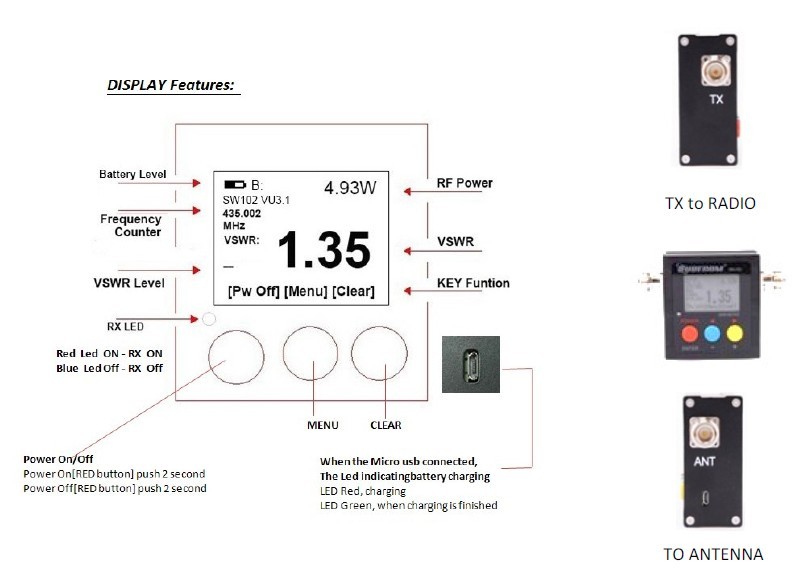
- Power ON/OFF:
Press 2 second the [Red button] to power on or power off
| MENU Dispaly (Note: Version for up to V2.02) | ||||
| No. | Mode | Adj |
Default Setting
| Content |
| 1 | Adjustment Forward | -99 to +99 | 0 | Fine Tune Level % |
| 2 | Adjustment Reverse | -99 to +99 | 0 | Fine Tune Level % |
| 3 | Adjustment Time Base | -99 to +99 | 0 | Frequency Counter ,OSC Time Base |
| 4 | LCD DIM (Back Light Time) | 0-9 | 1 | "0" is always on, 1 min to 9 mins |
| 5 | POWER OFF | 0-9 | 3 | "0" is always on, 1 min to 9 mins |
* Supplier, the product will add functionality without having to give notice | ||||
- Set & Save:
- Press MENU [Blue button]
- Press F1 [Red button)(Select 1-5 Funtion)
- Press [Blue button] ( - ), [Yellow button] (+)
- Press the [Red button ]for 2 seconds
- Press the [Blue button] to SAVE and EXIT
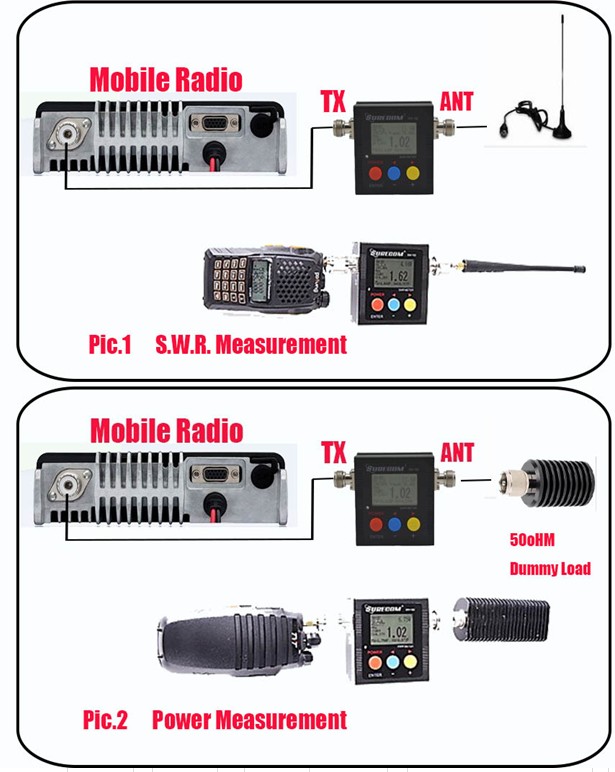
- How to check the S.W.R. of your Antenna :
Connect to "TX" on Radio output and Antenna to "ANT". Proper adaptor/cable is required if your device has different type of connectors.
- Measurement V.S.W.R. : (see Pic.1)
- SW-102 TX connect Radio RF out
- Radio TX , SW-102 with display S.W.R. measure data.
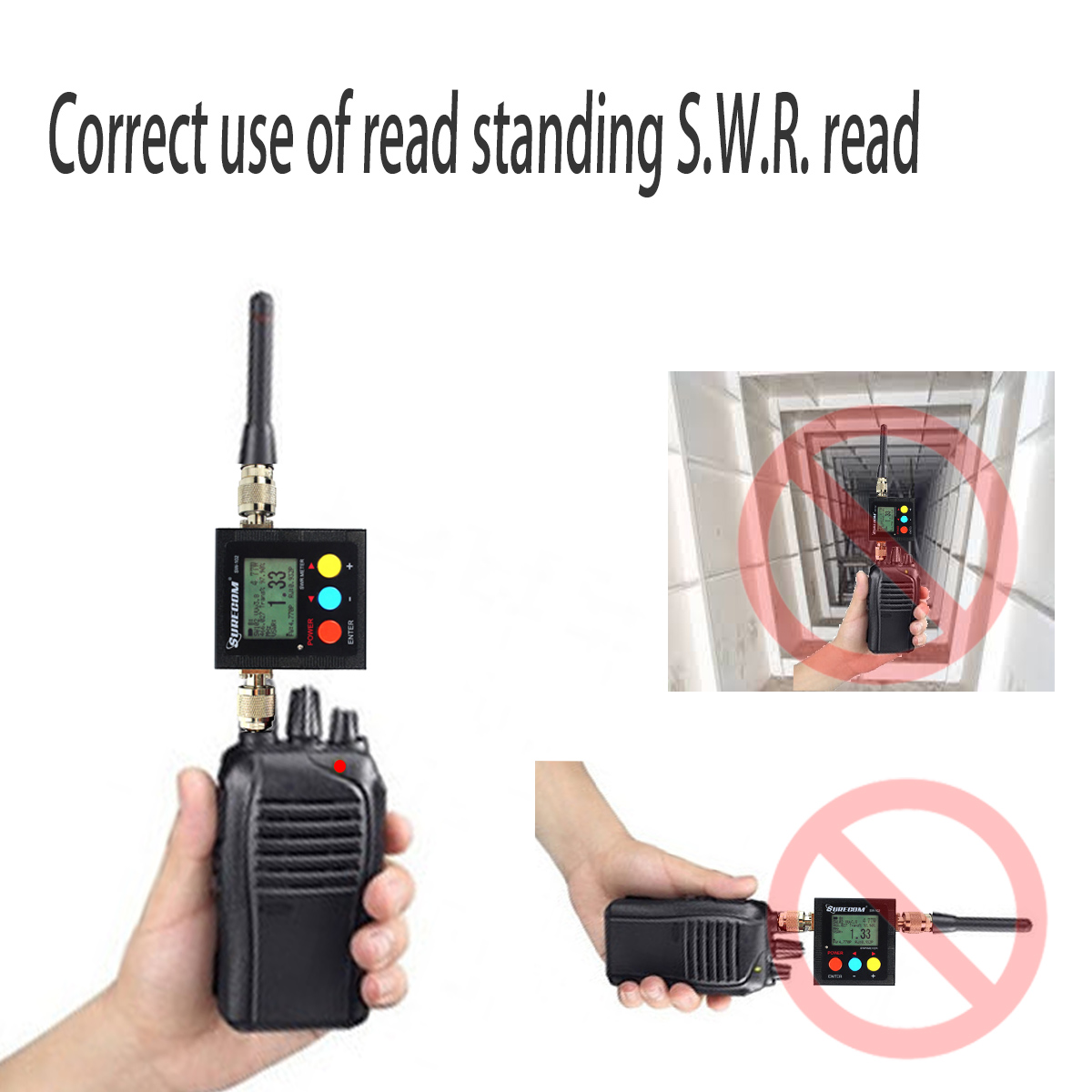
Do not affect the test in the following cases, there are objects nearby, placed horizontally.
- How to check the output Watt of your transceiver :
Connect to "TX" on Radio output and dummy Load to "ANT". Proper adaptor/cable is required if your device has different type of connectors.
- Measurement Power: (see Pic.2)
- SW-102 TX connect Radio RF out
- SW-102 ANT connect 50 ohm Dummy Load
- Push Radio TX , SW-102 display is Power measure data.
(SW-102 is not for DMR system)
- Package Contents
- 1x SURECOM SW-102-UV Power & SWR Meter (N - connector) (New Version 2.02)
- 1x USB Power PSU 100-240V
- 1x Mirco usb charger Cable
- 1x English Users Manual
- 1x 50w DUMMY LOAD
- **All Specifications are subject to change without notice
Anywhere to provide three years of free maintenance
SURECOM SW-102N +50W DUMMY LOAD :http://www.409shop.com/409shop_product.php?id=124376


留言
張貼留言